Home

Work

Overview

SAP Subscription Visual Configurator

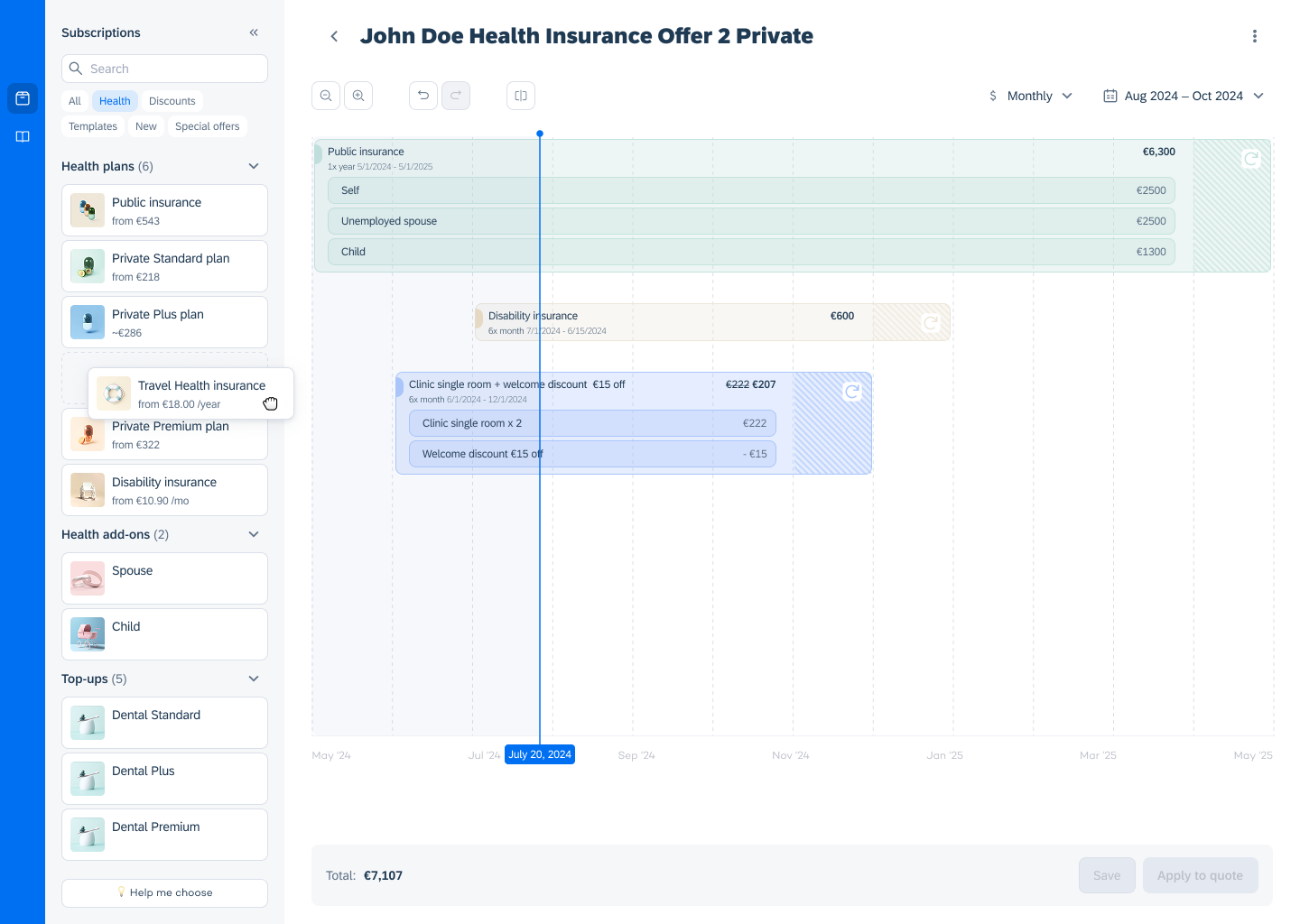
Redesigned SAP CPQ subscription configuration from a fragmented, table-based workflow into a visual timeline experience – enabling faster creation and comparison of complex subscription offers for sales teams.

Role

Sole Product Designer

Skills

Figma

Product Design

Prototyping

Client

SAP CPQ

Stakeholders

CTO

CPO

Head of UX

SAP CPQ (Configure, Price, Quote) is an enterprise platform used by sales teams to manage complex subscription offers — multi-component bundles, tiered pricing, and long-term contracts.

Problem

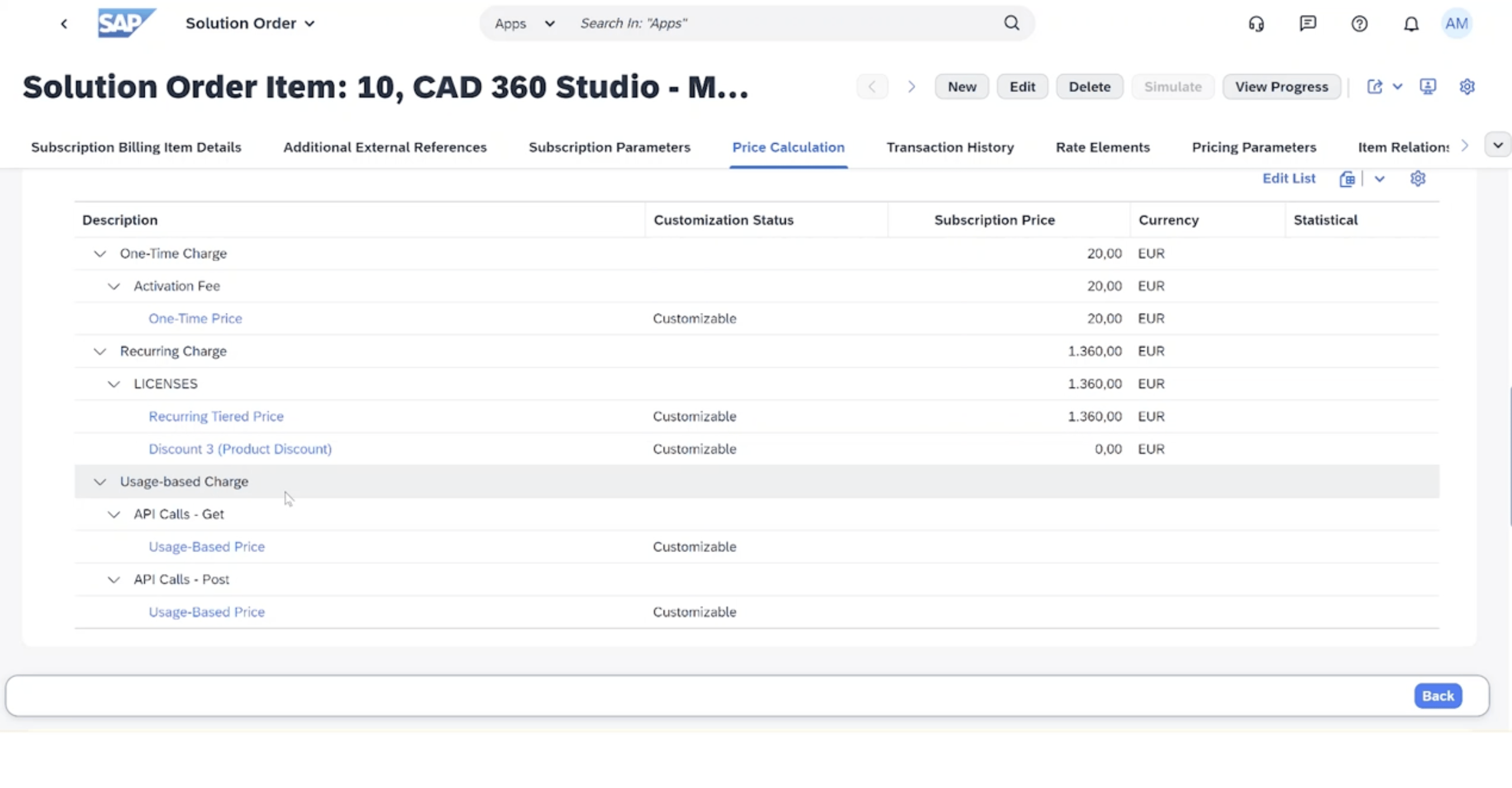
SAP CPQ relies on dense tables and nested modals

to configure subscriptions. For sales reps managing complex bundles — like health insurance packages — this means navigating multiple disconnected screens with no visual sense of what a subscription looks like over time.

The result:

high cognitive load

frequent errors

no way to confidently compare offers

Brief

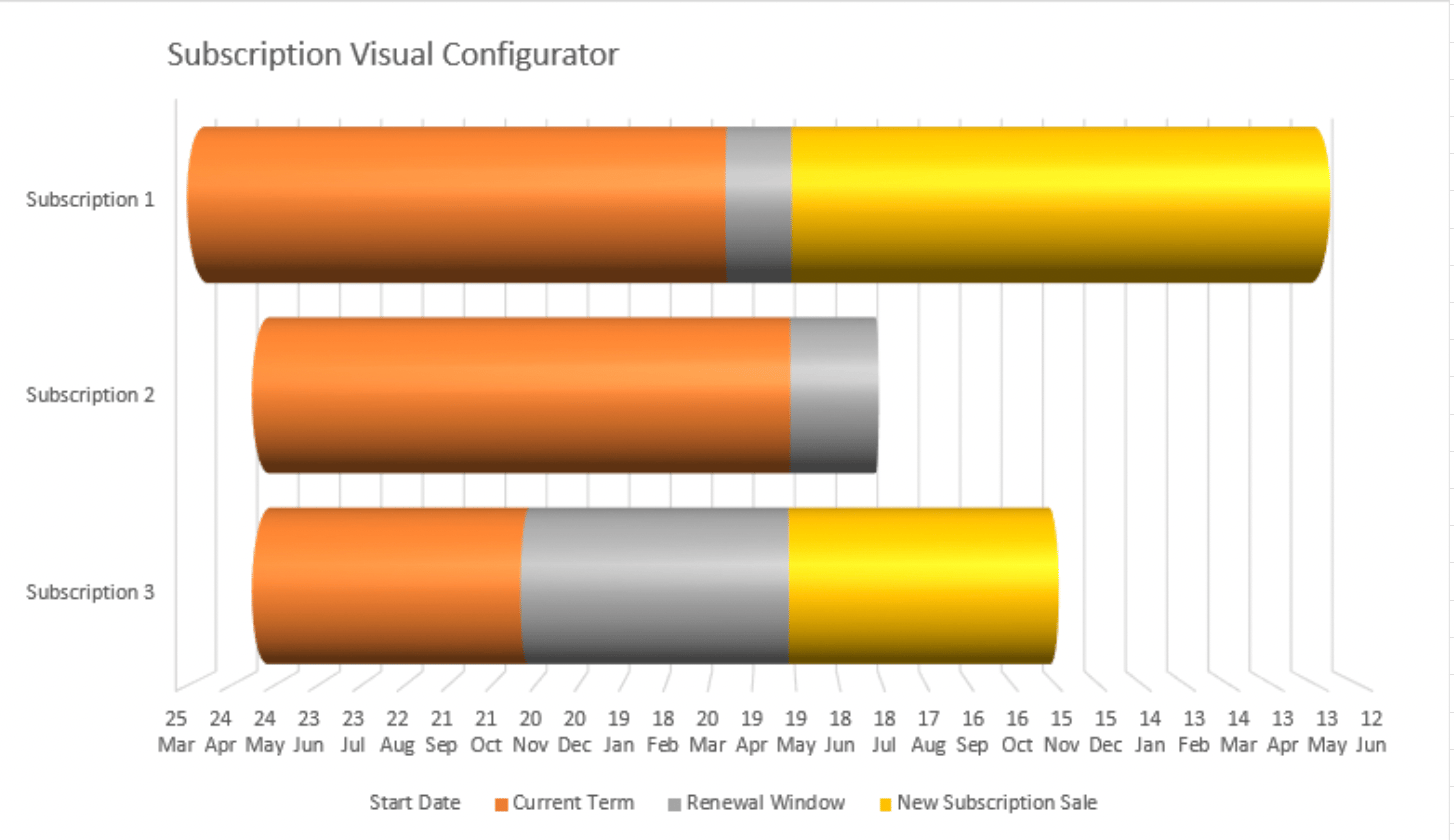
SAP's Head of CPQ came with a rough concept:

a timeline-based "tube" visualization of subscriptions. Strong idea, but only a PowerPoint sketch — no interaction model, no IA, no real-world scalability. My job was to turn it into a viable product.
Exploration

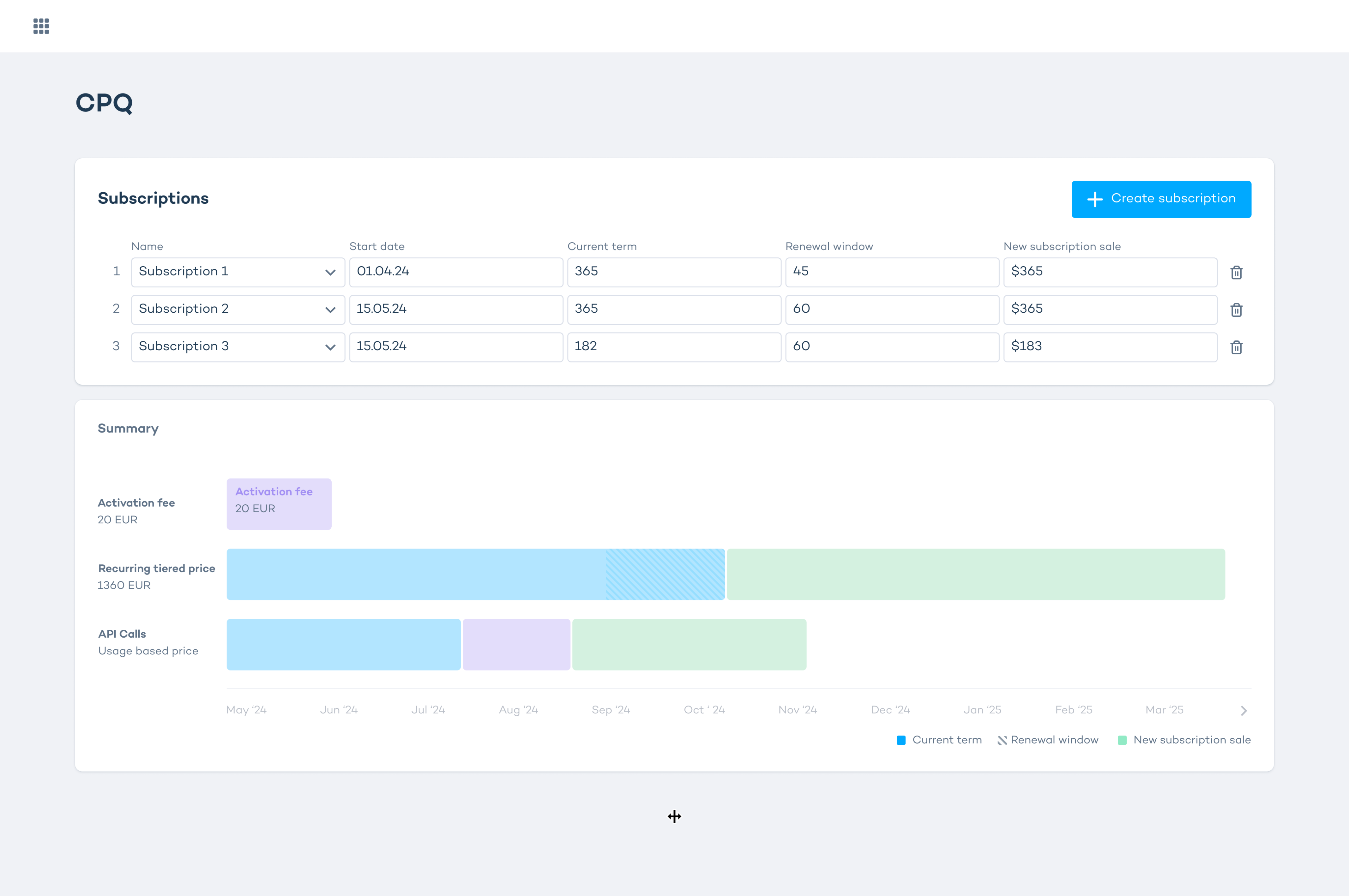
The core UX challenge was balancing visual clarity with access to complex pricing data.

I explored three approaches:

1. Inline fields above the timeline

Detailed plan info visible upfront.

Rejected: too much information at once,

poor scalability as subscriptions grow.
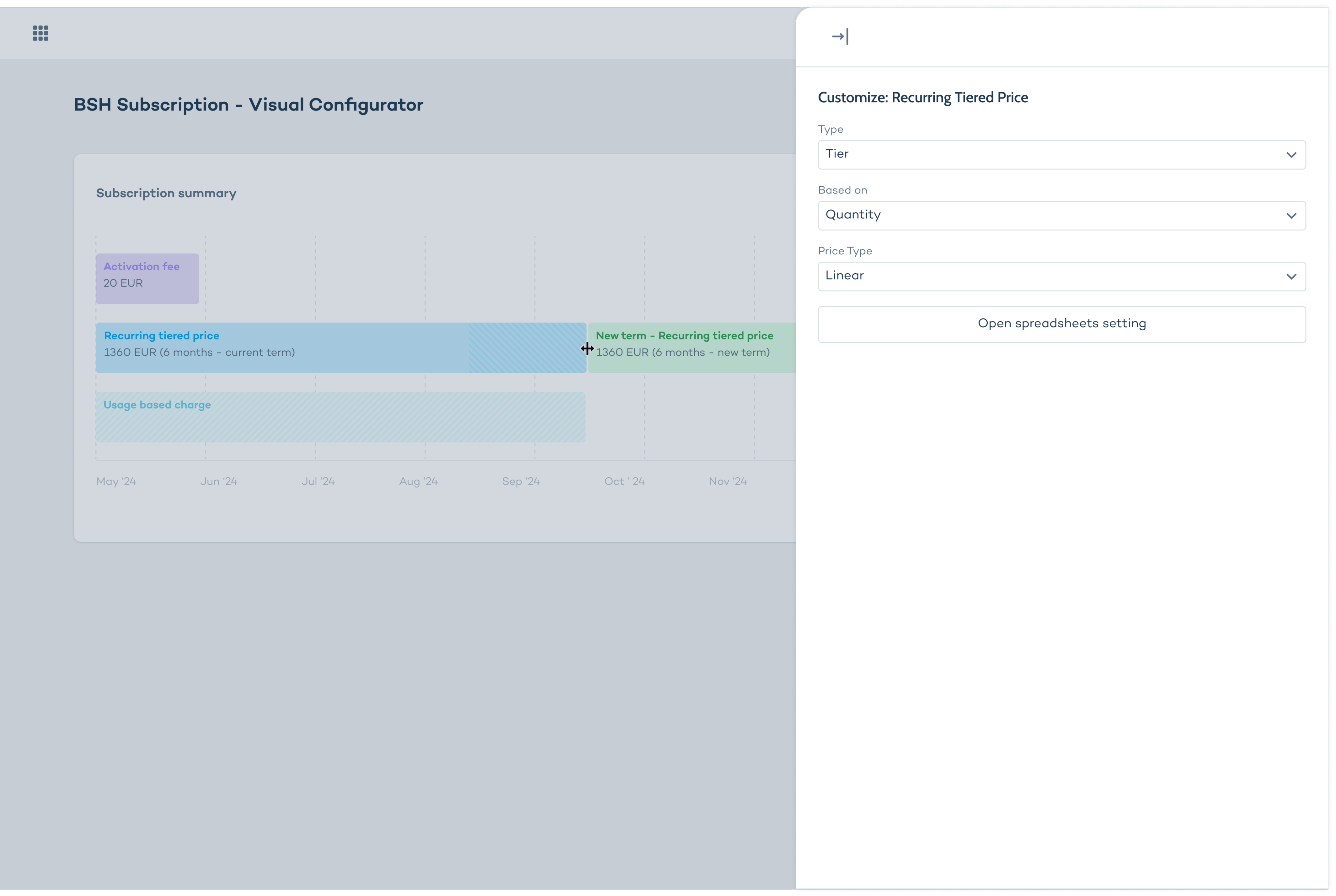
2. Side drawer on click

Timeline stays clean, details appear in a panel. Better information hierarchy, but splits attention between two areas.
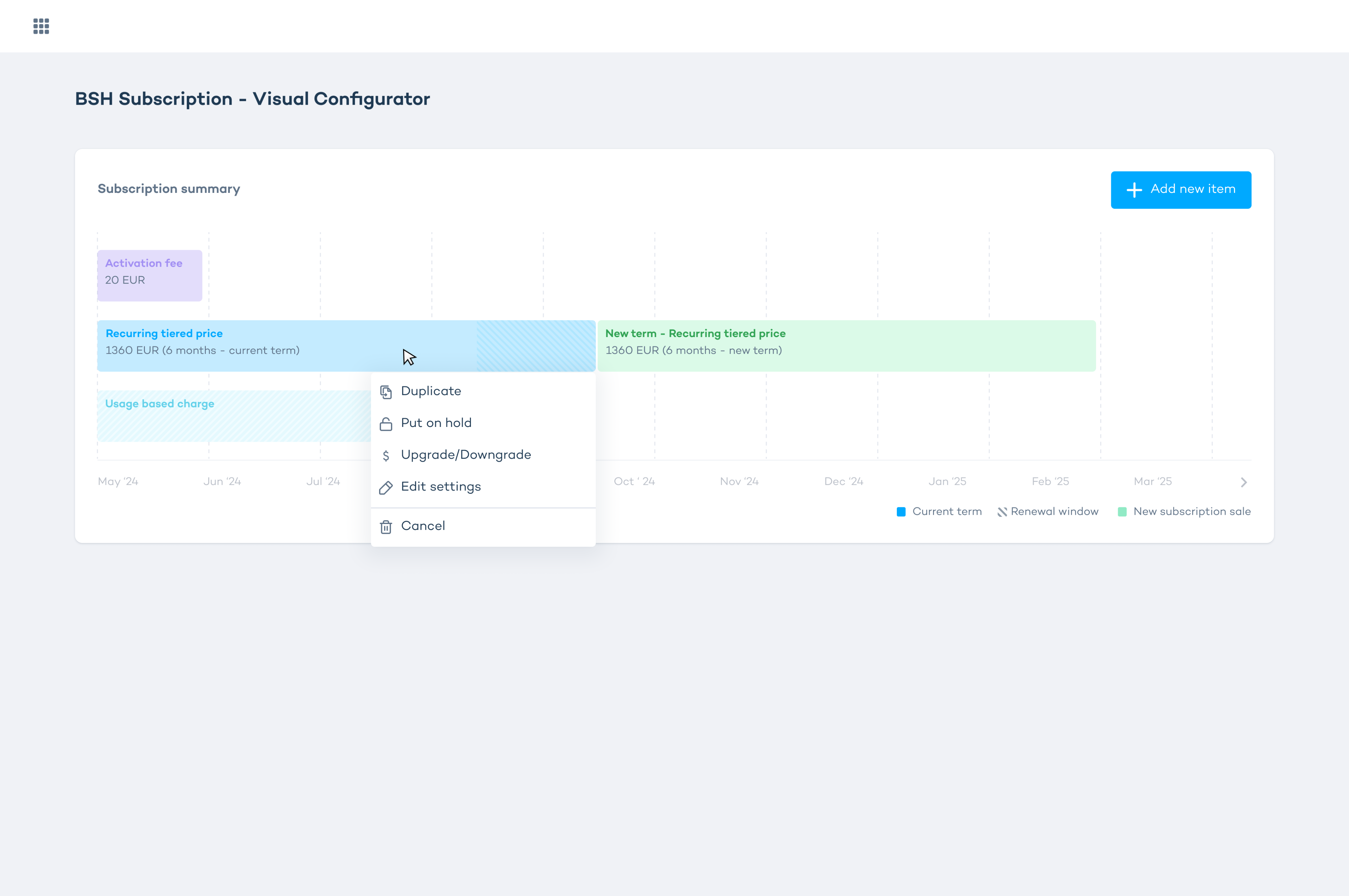
3. Contextual popup on click ✓

Details appear directly over the timeline item, keeping context intact. Most seamless, but required validating that all necessary fields would fit.

Tested and confirmed – this became

the final pattern.
Solution

Three core workflows, designed around real sales scenarios:

Workflow 1: Create & Compare

Build a subscription offer using drag & drop from the catalog, edit prefilled details inline, then compare it side-by-side with another draft and export to PDF for the client.

Workflow 2: Cotermination & Bundling

Coterminate multiple subscriptions for one client

and combine them into a bundle — one payment date, easier management. Pricing and discounts update live as items are dragged.

Workflow 3: Update Existing Subscription

Add new coverage to an existing plan using prebuilt templates — for example, adding foreign travel insurance to an active health plan.

Copyright © 2026 Anjelica Soboleva

Home

Work

Overview

SAP Subscription Visual Configurator

Redesigned SAP CPQ subscription configuration from a fragmented, table-based workflow into a visual timeline experience – enabling faster creation and comparison of complex subscription offers for sales teams.

Role

Sole Product Designer

Skills

Figma

Product Design

Prototyping

Client

SAP CPQ

Stakeholders

CTO

CPO

Head of UX

SAP CPQ (Configure, Price, Quote) is an enterprise platform used by sales teams to manage complex subscription offers — multi-component bundles, tiered pricing, and long-term contracts.

Problem

SAP CPQ relies on dense tables and nested modals

to configure subscriptions. For sales reps managing complex bundles — like health insurance packages — this means navigating multiple disconnected screens with no visual sense of what a subscription looks like over time.

The result:

high cognitive load

frequent errors

no way to confidently compare offers

Brief

SAP's Head of CPQ came with a rough concept:

a timeline-based "tube" visualization of subscriptions. Strong idea, but only a PowerPoint sketch — no interaction model, no IA, no real-world scalability. My job was to turn it into a viable product.

Exploration

The core UX challenge was balancing visual clarity with access to complex pricing data.

I explored three approaches:

1. Inline fields above the timeline

Detailed plan info visible upfront.

Rejected: too much information at once,

poor scalability as subscriptions grow.

2. Side drawer on click

Timeline stays clean, details appear in a panel. Better information hierarchy, but splits attention between two areas.

3. Contextual popup on click ✓

Details appear directly over the timeline item, keeping context intact. Most seamless, but required validating that all necessary fields would fit.

Tested and confirmed – this became

the final pattern.

Solution

Three core workflows, designed around real sales scenarios:

Workflow 1: Create & Compare

Build a subscription offer using drag & drop from the catalog, edit prefilled details inline, then compare it side-by-side with another draft and export to PDF for the client.

Workflow 2: Cotermination & Bundling

Coterminate multiple subscriptions for one client

and combine them into a bundle — one payment date, easier management. Pricing and discounts update live as items are dragged.

Workflow 3: Update Existing Subscription

Add new coverage to an existing plan using prebuilt templates — for example, adding foreign travel insurance to an active health plan.

Copyright © 2026 Anjelica Soboleva

Home

Work

Overview

SAP Subscription Visual Configurator

Redesigned SAP CPQ subscription configuration from a fragmented, table-based workflow into a visual timeline experience – enabling faster creation and comparison of complex subscription offers for sales teams.

Role

Sole Product Designer

Skills

Figma

Product Design

Prototyping

Client

SAP CPQ

Stakeholders

CTO

CPO

Head of UX

SAP CPQ (Configure, Price, Quote) is an enterprise platform used by sales teams to manage complex subscription offers — multi-component bundles, tiered pricing, and long-term contracts.

Challenge

SAP CPQ relies on dense tables and nested modals

to configure subscriptions. For sales reps managing complex bundles — like health insurance packages — this means navigating multiple disconnected screens with no visual sense of what a subscription looks like over time.

The result:

high cognitive load

frequent errors

no way to confidently compare offers

Brief

SAP's Head of CPQ came with a rough concept:

a timeline-based "tube" visualization of subscriptions. Strong idea, but only a PowerPoint sketch — no interaction model, no IA, no real-world scalability. My job was to turn it into a viable product.

Exploration

The core UX challenge was balancing visual clarity with access to complex pricing data.

I explored three approaches:

1. Inline fields above the timeline

Detailed plan info visible upfront.

Rejected: too much information at once,

poor scalability as subscriptions grow.

2. Side drawer on click

Timeline stays clean, details appear in a panel. Better information hierarchy, but splits attention between two areas.

3. Contextual popup on click

Details appear directly over the timeline item, keeping context intact. Most seamless, but required validating that all necessary fields would fit.

Tested and confirmed – this became

the final pattern.

Solution

Three core workflows, designed around real sales scenarios:

Workflow 1: Create & Compare

Build a subscription offer using drag & drop

from the catalog, edit prefilled details inline,

then compare it side-by-side with another draft

and export to PDF for the client.

Workflow 2: Cotermination & Bundling

Coterminate multiple subscriptions for one client

and combine them into a bundle — one payment date, easier management. Pricing and discounts update live as items are dragged.

Workflow 3: Update Existing Subscription

Add new coverage to an existing plan using prebuilt templates — for example, adding foreign travel insurance to an active health plan.